How to Pay NBI Clearance Using GCash 2026
To pay NBI clearance fee in the Philippines, GCash is considered one of the most popular and trusted options. If you are on the NBI Appointment portal right now and it is time to pay, and you selected GCash but are confused about how to take the next step, don’t worry. Be confident, select the option between Bills Payment and QR code, and complete your transaction.
If you are outside the portal, you can still pay the NBI fee using the GCash app. This guide will show you exactly how to pay using QR code or bills payment, what buttons to click, what to do at the branch, and how to receive your NBI payment receipt using GCash from start to end efficiently.
NBI GCash Payment Methods
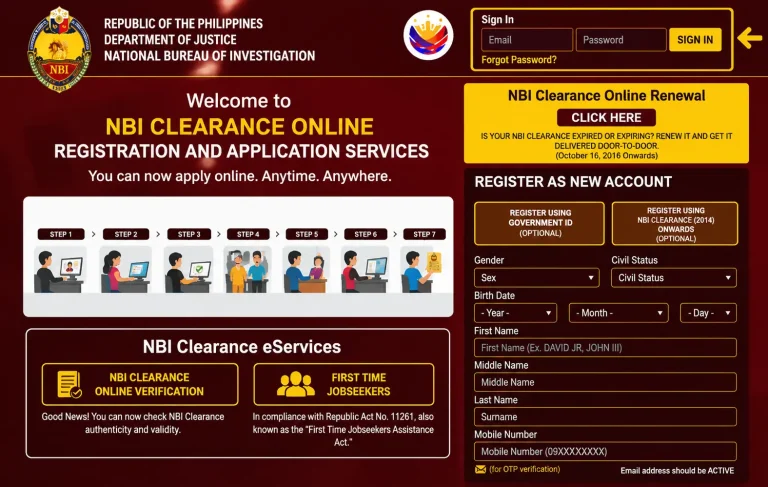
You’ll get your NBI Reference Number automatically while applying for NBI Clearance on clearance.nbi.gov.ph, right after you enter your details and select GCash as your payment method. It is different from your Application ID, and it is important because GCash needs the Reference Number to connect your payment with the correct NBI Clearance application.
Screenshot it or write it down exactly as shown (SOMETHING LIKE: MP72G81S), because an extra space or missing character can cause the payment to fail or be linked to the wrong application. Now the next step is , “How to pay NBI Clearance using GCash”! You can pay your NBI Fee through GCash with the help of the following methods given below; choose the method that suits your comfort:
1. How to pay NBI Clearance using GCash App (Bills payment)
This is the most common payment method and still works even when the QR code does not load properly on your screen.
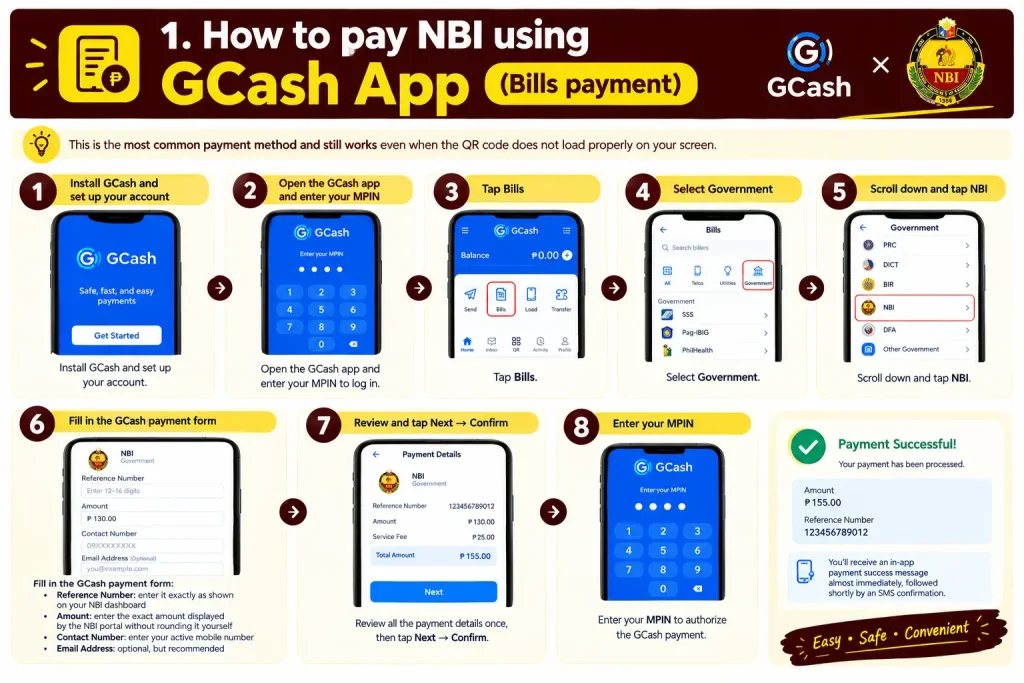
You’ll receive an in-app payment success message almost immediately, followed shortly by an SMS confirmation.
2. How to pay NBI using GCash App (QR Code)
If you’d rather skip manual entry, use this method instead. It works both when you’re paying from home during the NBI online application and when you’re already at an NBI branch or partner payment center where a QR code is displayed on the screen or at the counter.
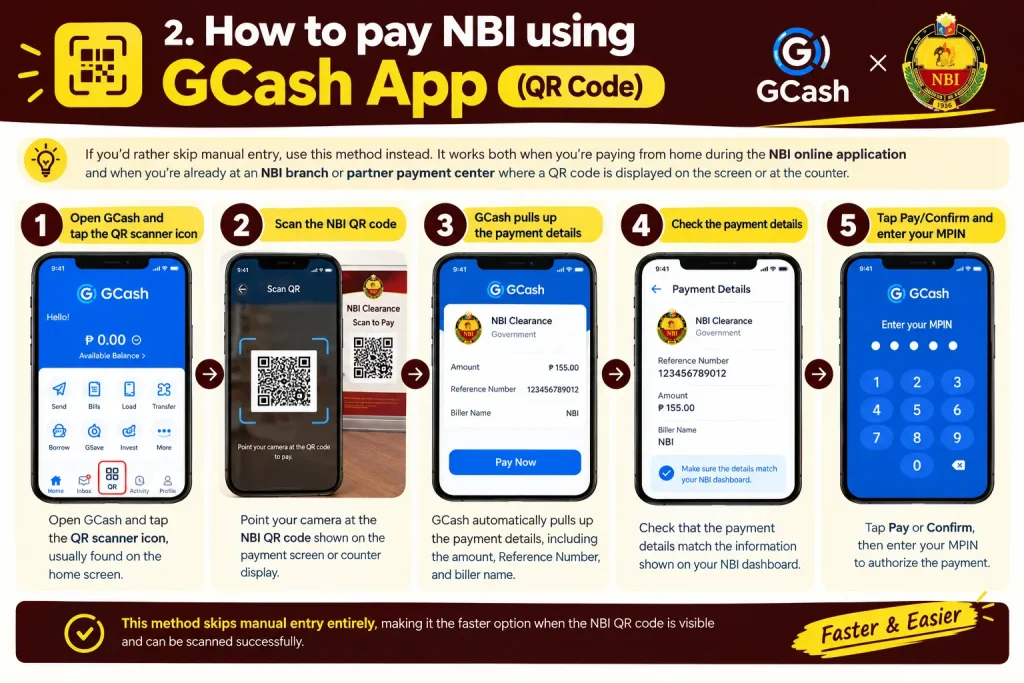
This method skips manual entry entirely, making it the faster option when the NBI QR code is visible and can be scanned successfully.
3. How to pay NBI fee using GCash from NBI Clearance Website
NBI Clearance Renewal and GCash Payment
Can renewal be paid through GCash?
Yes. If you already have an NBI Clearance issued after 2014 and your personal details have not changed, you can use GCash for the renewal payment in the same way as for a first-time application.
How to pay NBI renewal fee using GCash
The payment steps are the same as for a new application because NBI Clearance renewal uses the same online portal and payment system:
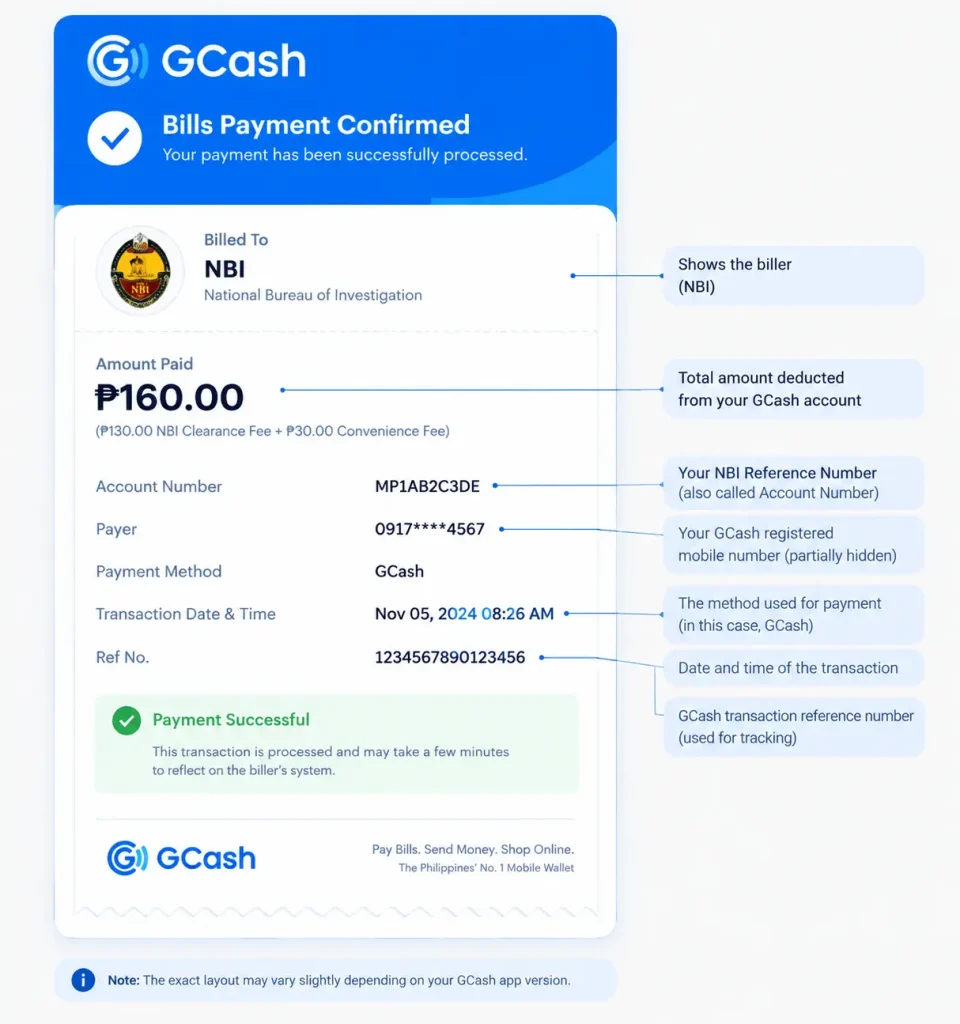
NBI Payment Confirmation Slip
Check your NBI payment status. If it changes to “Paid,” log in to clearance.nbi.gov.ph and open your transaction or application details to view your payment confirmation. You can save or print it and bring it to your NBI appointment with your valid ID.
What the payment confirmation slip shows:
What it looks like:
It is a confirmation or receipt-style page containing your NBI application, payment, and appointment details, with the Reference Number clearly displayed.
How to Set Up a GCash Account
To pay NBI Clearance using GCash, you must have a Valid GCash Account .Setting up your account usually takes about ten minutes. You can do this in 7 simple steps only :
How Much Is the NBI Clearance Fee When Paying With GCash?
The actual breakdown based on the NBI Clearance fee and the GCash or e-payment service charge is given below:
| Fee Component | Amount | Source |
| NBI Clearance Fee | ₱130 | Confirmed directly on nbi.gov.ph, the primary official NBI source |
| GCash / E-Payment Service Charge | Approximately ₱25 | The NBI website provides this as a range rather than one fixed amount |
| Total Estimated Amount | ₱155 | Based on the official NBI fee and service-charge range |
This means your total GCash payment for NBI Clearance may be around ₱155 to ₱160, depending on the applicable e-payment service charge. The total amount always vary depending upon your e payment service charges between 155 to 160 peso.
Note: If you are applying for NBI Doorstep Courier Delivery (for renewals without changes), an additional courier shipping fee, typically starting at ₱200+, may be added, bringing the total delivery cost to around ₱355.00. For standard in-person branch appointments, the total remains ₱155.00.
Why Pay NBI Clearance Using GCash?
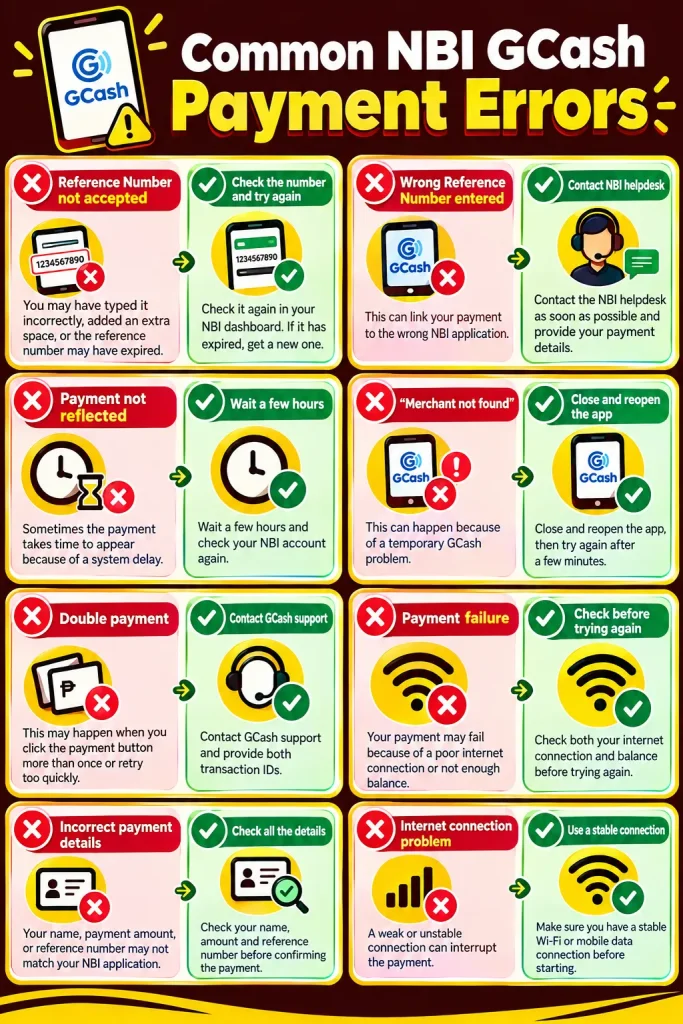
What If Your GCash Payment Doesn’t Show in NBI?
This can happen sometimes, and it does not necessarily mean your payment is lost.
Common NBI GCash Payment Errors
Frequently Asked Questions
Conclusion :
Knowing how to pay NBI using GCash makes the NBI Clearance payment process easier. You can complete the payment through the GCash app using the available Bills Payment or QR code option, depending on what is shown during your NBI application.
Before confirming the payment, check your NBI Reference Number, payment amount, and other details carefully. After the transaction, keep your GCash payment receipt and check your NBI dashboard to confirm that the payment status has been shown as paid. With these steps, you can complete your NBI Clearance payment and prepare for your scheduled NBI appointment.